Published article
Aurora, the Swiss knife of voice assistants
Aurora is my open-source, local-first voice assistant: wake word, 24/7 opt-in transcription, tool-calling orchestration, MCP support, RAG memory, scheduling, and a distributed mesh — all running on your own hardware.
- aurora
- ai
- voice
- agents
- privacy
What can it currently do?
- Listen for voice commands in the background;
- Optionally transcribe audio 24/7, enabling daily summaries (opt-in and 100% local);
- Interactive UI chat for long-form responses and text exchange/activation;
- Orchestrator Chatbot that can call tools and reason through their functionality to achieve user requests;
- Keep contextual conversations and chats;
- Store information the assistant deems important about the user, so it can use it in the long run;
- Scheduling and cronjob system that enables reminders, events, timers, and integrated tools such as Pomodoro's.
- Respond to user requests using voice (TTS) as well as text through the UI;
- Extensible tooling system, easy to code your own tools;
- Model Context Protocol (MCP) tooling support, which means easy setup for great integrations and support to an ever expanding ecosystem;
- Retrieval Augmented Generation (RAG), used to enhance the agent's knowledge by searching for memories that are relevant to the user's request; it's also used to match only relevant tools per request. You can add as many plugins as possible without bursting your context windows or risking context poisoning.
How is it private?
- Listen to a customizable wake word (Eg: Jarvis, Aurora) using OpenWakeword or Pvrcupine;
- Once a wake word is detected, transcribe the user's request using a Whisper model;
- Local text-to-speech responses using Piper, choose from many different voices (and voice qualities);
- Embeddings for RAG can either be OpenAI's or local Hugging Face embedding models;
- All done locally on consumer-grade hardware; no need for GPU in lower-sized models;
What about the Brain? Can it run on local LLM's? Yes (kind of), there's currently built-in support for running open-source models through Hugging Face and Llama.Cpp for quantized models, as well as running it through the cloud on OpenAI and Hugging Face endpoints.
Wakeword Detection
The wake word detection was mainly built using the RealtimeSTT lib abstraction, it uses either Pvrcupine or OWW (Open Wake Word) under the hood, both are extremely lightweight models that allow the recognition of a specific word such as Jarvis, Aurora, Alexa, etc, while being processed in real-time within the CPU.
The later (OWW) allows for easy training of new wake words so you can even customize the way you call your assistant.
Aurora listens 24/7 in the background completely locally, passing the audio through this model, detecting or not the presence of a wake word, and immediately discarding the audio right after.
STT (Speech to Text)
The STT was also mainly based on the RealtimeSTT module, which uses faster-whisper and Silero VAD for voice activity detection under the hood, but it was eventually migrated into its own direct implementation using both aforementioned models in order to have better flexibility and support more features (Such as ambient transcription).
It's configurable so you can choose the size of the whisper model you want to run depending on your hardware, preferred language, quality of transcription and performance tradeoffs.
Ambient transcription
Ambient transcription is optional and when activated it essentially redirects the 24/7 audio input through the TTS model as well as the wake word model, discarding the audio and storing the transcriptions, either on a file or within the database (configurable) for later access by the assistant.
The ambient transcription process the audio in chunks through a priority queue that serves as access control to the faster-whisper model, whenever a wake word is detected it has higher priority over ambient transcription chunks, which are then later processed after the wakeword request is tended to. Ensuring that the responsivity of the assistant is not compromised.
TTS (Text to Speech)
The TTS module is also based on RealtimeTTS, a second lib of it's family focused on TTS, specially due to it's modularity and rich ecosystem of options with plug-in support for different local TTS models.
The main one used currently is PiperTTS, due to its cross-platform characteristics, big variance of voice sythesis qualities and language support.
Support for cloud and other local providers are also coming soon.
RAG (Retrieval Augmented Generation) and Embeddings
RAG serves multiple purposes within Aurora;
First and foremost it's used by the main agent to store important information and memories about the users, so it can learn long term and use it whenever appropriate depending on the user request. This is persistent and long term, different from the thread/conversation specific history of messages the agent also has access, allowing for a multi-turn and continued conversation.
And secondly, it's used for matching tools out of the tooling system, allowing for the growth of user's tool ecosystem without limits or restrictions due to context window size and context poisoning, which would be inherent if all system tools were sent for every request. (This however brings it's own set of challenges, which will be addressed better by specialized agents in the future)
The embedding providers currently supported are OpenAI (Cloud) and Huggingface (Local), llama.cpp is also incoming for quantized models.
Tooling System
The tooling system supports easy and modular addition of plugins directly from the rich langchain ecosystem. There are thousands of tools and toolkits available. By using the framework default definition of tools it's also easy to extend and create custom tools through code for those that are a bit tech savy.
Besides the default plugins/tooling, Aurora also supports MCP, the biggest ecosystem of plugins for LLMs at your service. It supports both local (stdio) servers as well as remote (http, sse, websocket) servers. *OAuth support incoming.
It also supports MCP discovery, meaning you can easily add already configured MCP servers from other clients within your computer such as Claude Code, Cursor, Copilot, etc.
Brain
The brain and orchestration rely on the Langgraph and Langchain frameworks for building the main Chatbot and it's interactions with tools and other agents.
It currently supports tool calling through OpenAI models, llama.cpp quantized models (using chat templates for non-native tool calling LLMs) and Huggingface (local and cloud).
That also means that Aurora can very easily grow to support multiple other LLM providers using the langchain ecosystem of plug-ins, be them cloud based (Anthropic, Gemini, Grok), or local based (Ollama, llamafile, vLLM).
Langgraph might sound overkill as the project currently only has a simple main Chatbot agent that can reason through tool calls and results until user request is acomplished, however it was built with the purpose of extensibility, as the MOTO of Aurora is to allow for customization, future releases will aim at a supervisor and sub-specialized deep Agents architecture, with the ability of alocating specific tools to those experts, allowing for much more complex actions and reasoning to take place on your behalf.
Pinch of Salt on local LLMs
Model development rate has been astounding in many areas; being able to run WWD, TTS, STT, and embedding models all at once in consumer-grade hardware is already a great achievement.
However, LLMs are not quite there yet; it still requires at least an entry-level GPU to be able to run the smaller models locally with reasonable response times. I myself have been testing on a discrete notebook GPU (RTX 3050 4GB).
Many great models can run on entry-level GPUs, especially when quantized and with layering support, such as the Gemma 3 12B family. However, in my experience, none of them are good enough yet to consistently support tool calling, an essential part of the agentic workflow of Aurora. We have support for it nevertheless, for those that wish to test out bigger models. Gemma 3 27B for example, should work reasonably well.
Not everything is lost, however; the development of capabilities for small models to be deployed on consumer devices has accelerated, many new exciting techniques and optimizations are coming up, and soon we'll have a good enough model to properly run on consumer-grade GPU, who knows, maybe even on CPU. A good example of that is the brand-new Gemma 3n model.
Should I use Aurora?
Though the objective of the project is to be beginner-friendly, it's not yet at a point where non-developers can fully/easily setup utilize all of its capabilities.
Developers and tech enthusiasts are more than welcome to try it out and give feedback or even contribute.
Long-term vision
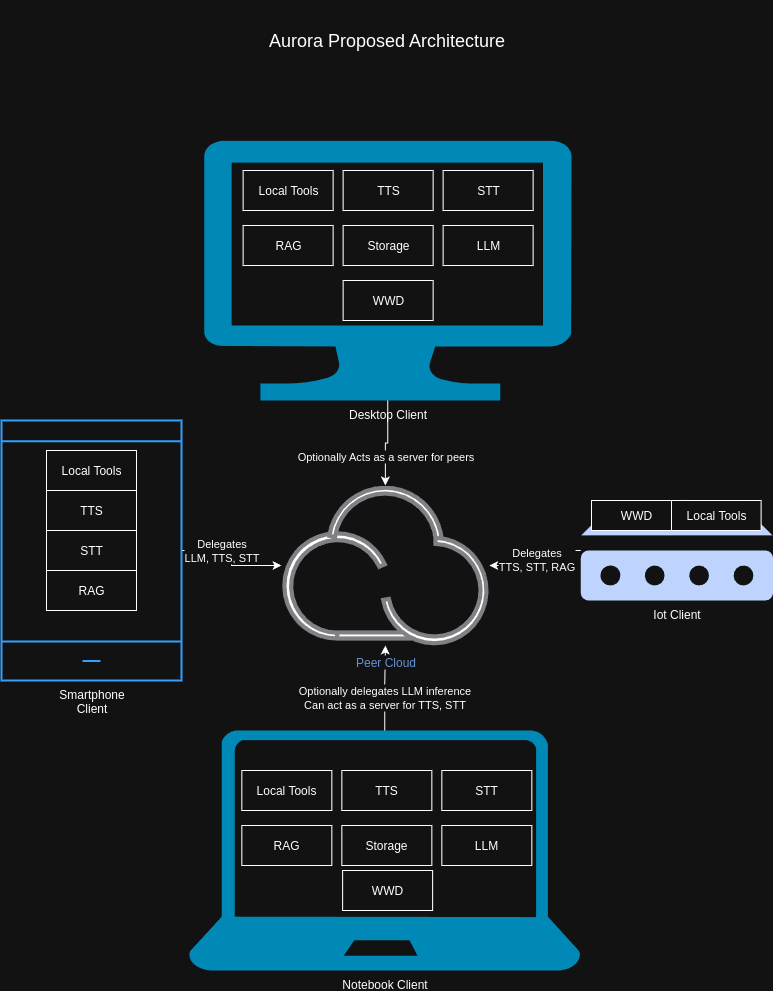
The core concepts behind Aurora, besides its richness of capabilities, are accessibility and privacy, and as such, the next steps for the project will focus on making it usable across devices and platforms.
Currently, an architecture overhaul is under way, with the purpose of supporting a client-server architecture for proper usage in even less powerful devices.
The new architecture will allow for parallel processing of the multiple functionalities and self-hosting of a private server, as well as support P2P protocols for users that simply want to run the assistant on stronger hardware and easily access the assistant from multiple devices (smartphones even) across the internet without the hassle of setting up a public IP server.
An UI overhaul is also planned, the current one was built as a POC using PyQT6 for cross-platform interfaces, however the plan is to also properly support Android and IoS.
https://github.com/joaojhgs/aurora
Originally published on LinkedIn.
Related projects: public writing